Lambda functions are small and anonymous functions.
Lambda function can take ‘n‘ number of arguments, but will have only one expression.
To create a Lambda function in Python, we need use Lambda keyword.
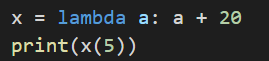
Let’s see with an example. If we assign a function to a variable, it becomes an anonymous function and thus a lambda function.
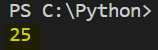
The output of the above statement is:
Here, we have a lambda function which takes variable ‘a’ and adds that variable ‘a’ with 20.
Hence, if we call x(5) -> The lambda function executes and it adds 20 to 5 and hence, the output 25.
Now, let’s try by wrapping the lambda function within a function.
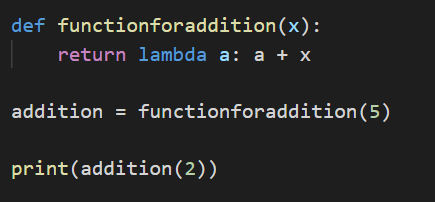
In the above example, functionforaddition(x) is a function that has a lambda function that add the value of x with a. x is the variable that is passed via functionforaddition().
In the second line, we are passing 5 in the functionforaddition(x) and this function we are assigning it to a variable called as addition.
Please note that variable addition is assigned with a function. Usually, we assign a variable with any value, but, here it is assigned with function.
We are calling addition function in the last statement by passing 2 as a parameter.
So, 2 will be replaced with variable ‘a’ and 5 will be replaced with variable ‘x‘.
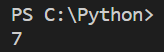
Hence, the output will be as shown below:
It is adding 2 and 5 and it is displaying the addition of 5 and 2 i.e., 7.
Assigning functions to variable, makes it anonymous, hence, lambda function.
Arguments Consider our previous function that was created that takes two parameters, num1 and num2.
So, while calling the function we need to pass the same number of parameters i.e., if the function definition has two parameters, we need to pass two values, if the function definition has three parameters, we need to pass three values.
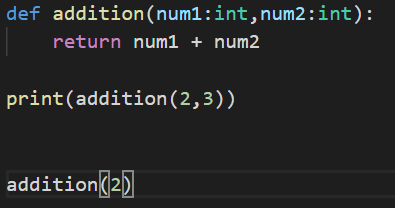
Let’s see what will happen in case the parameter’s count are not matching:
In the last sentence, we are calling addition function with only one parameter. We will get error as below:
It clearly says that one parameter is missing and the parameter is num2.
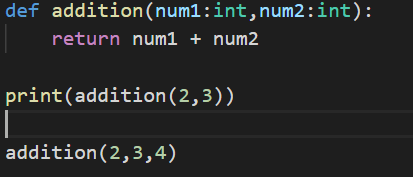
Now, let’s try calling the function by giving more number of parameters as shown below.
In the last sentence, we are calling the addition function with 3 parameters but the definition is expecting only two parameters.
This will again throw an error as shown below:
The error message clearly says that the function expects 2 arguments however 3 parameters were given.
Default Parameters
Now, there could be a scenario where we need to pass some default values to the parameters when there are no values passed.
Let’s discuss with an example:
Let’s reuse the same addition function that we created earlier.
Now, while calling the function, we need to pass two parameters. If we don’t pass the required parameters, it will throw an error as discussed earlier.
To avoid these type of issues, we can use default parameters where we can specify default value to the parameters.
Let’s understand with our same addition function, but observe the parameters now in the definition.
If you observe the parameters, we have passed the default values to the parameters.
The default value for num1 is 1 and num2 is 2.
Now, let’s try calling the function by not passing any parameter, or by just passing one parameter as shown below.
We have called the addition function in three different ways like by not passing any parameters, by passing only one parameter and by passing the required parameters.
The output is:
The first addition has taken the default value for the parameters and did an addition for 1 and 2 (as there was not values passed) and thus, the output is 3.
Please note that there is no error now.
Similarly, in the next statement, we have called addition function with only one parameter value i.e., 4.
Now addition function has replaced num1 with 4 and as num2 doesn’t have any value, it has used the default value i.e., 2 and the addition of 4 and 2 is 6 and thus, the output.
Please note that there is no error now either.
In the next statement, we have called addition function with both the parameters i.e., 4 and 7
Now addition function has replaced num1 with 4 and num2 as 6 and the addition of 4 and 6 is 10 and thus, the output.
We have learnt enough of functions now. I will come back to you with another post on a different topic in Python.
Functions are logical grouping of code statements that collectively performs a specific operation or a specific requirement.
Example: If I am building a calculator, a calculator can perform various mathematical operations like addition, subtraction, division, etc.
I can create one function for addition, one function for subtraction, one function for division, and so on.
Let’s now again further dig down to one function, addition.
What are minimum requirements to perform addition, 2 NUMBERS. We can perform addition only if we have 2 NUMBERS with us. These 2 numbers are called as input parameters or arguments.
When I pass two numbers to addition function, the addition operation can be performed.
During this operation i.e., during the addition of 2 numbers, what is the output or the end result?
1 NUMBER which is the addition of 2 NUMBERS.
Therefore, the 1 NUMBER which is the result of addition of 2 NUMBERS is called the output of the function.
So, we need to pass the input to the function i.e., called as parameters or arguments.
The output that we get after performing an operation within the function can be fetch using the return type.
Let’s understand better with an example:
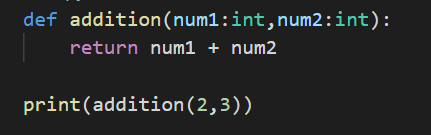
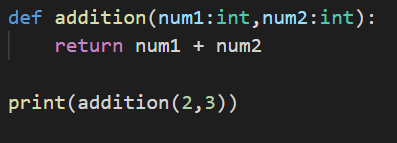
In Python, functions are created using def keyword. In the above code, I have created a function called addition.
addition function takes two parameters, i.e., num1 and num2.
The second statement is the actual addition it is performing, it is returning the value after adding num1 and num2.
Important point to note is: functions code (i.e., addition function here) will not be executed unless or until it is called.
So, what does it mean calling a function.
Let me explain with an example:
Assume that we have only this code,
This is again a addition function which takes two numbers as parameters and performs addition operation and return one value.
When we have only this code and try to execute this, we will not see any result.
Why? Because we have not called this function.
Calling a function is invoking a function to execute by providing the required input parameters or arguments values.
In the above code, we don’t know what is the value of num1 and what is the value of num2.
Hence, we will not get any result.
However, if we pass values to these function by calling addition, it will return a value.
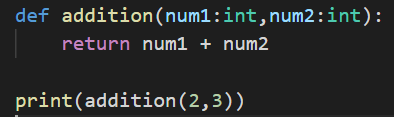
Observe this code carefully. We have a function definition addition that is taking two parameters and returning the addition of two parameters that is passed to the function.
In the last line, addition(2,3) -> what is this statment used for?
This is used to call the definition of the addition function by passing two values, i.e., for num1 = 2 and num2 = 3.
return num1 + num2 will be replaced by return 2 + 3 during the execution of the function.
However, even now we will not see any output. Why? Because, we aren’t printing the value of the addition function.
Now, let’s call a function inside a print statement so that the value that is returned from the function can be printed.
Now let’s see what would be the output:
Yeah. The addition of 2 and 3 is 5. Hence, we got the output as 5.
Now, try similar way for subtraction, multiplication, division, etc until I return to you with one more advanced post on FUNCTIONS.
Please comment or provide your feedback on the blog. Thanks. 🙂
As it says in the header, FOR LOOP is used when we want to execute block of code statements again and again until a condition is met, we can use For loops.
To be very specific, to iterate any collections, like a list, tuples, etc. we can use For loops.
Example: Let’s understand FOR Loop with an example. Let’s try to create a list and try to print all the values in the list using FOR loop.
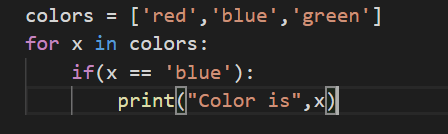
In the above code, colors have the list of values i.e., red, blue and green.
In the second line, for loop is used which will take each value from the colors list and feed into x variable.
In the last line, we are printing the value of x variable which contain the value of colors list and this gets repeated until the values in the colors list are exhausted i.e., this code will run for 3 times as there are three values in the colors list.
Output:
The code ran for 3 times which is equal to the number of values in the colors list.
For Loop with Condition:
Now, let’s assume that we need to print only when a specific condition is met i.e., print only when the color is blue.
Example:
I have added an if condition which will check if the x variable contains the value we need, i.e., blue.
Print statement will be executed only if the above condition is met.
Output:
In the output, it only printed when the color is blue. Hence, print statement doesn’t gets executed if the condition is not met.
Likewise, we can use for loop with other keywords, like if, while, etc. based on our requirement.
I hope this would have given a basic idea about FOR Loop.
Thanks for subscribing my blog. Meet you soon with my next post. 🙂 Stay Safe. 🙂
While Loops can be used if we need to execute the same set of statements again and again until a condition is met.
For example, if we need to print a statement 5 times, we can use while loop.
Let’s try to understand with an example:
Example:
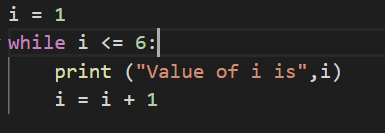
Let’s try to print the value of variable i against a condition, i.e., to print the value of i only when it’s value is less than or equal to 6.
In the above code, we have a variable, assigned with a value 1. There is a condition in while loop i.e., i <= 6, which means it is checking if the value of i variable is less than or equal to 6.
Only if this condition is met, the value of i is printed.
There is one important expression in the last line, i.e., i = i + 1.
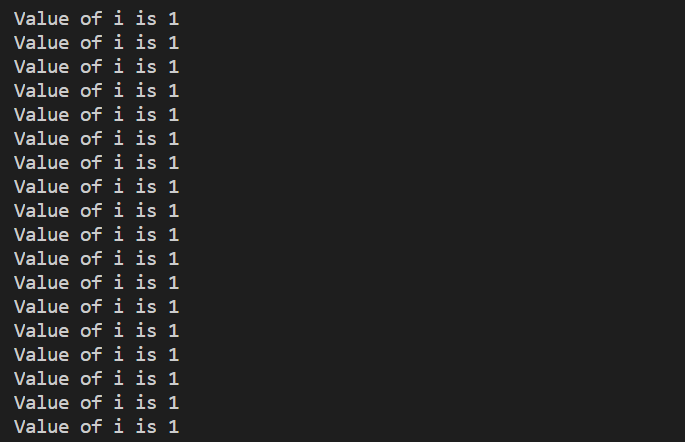
Why this line is added? Assume that this line is not present. What will happen? When the code executes, initially, i is assigned with a value 1 and while loop checks if this value is less than 6, which is true and prints the value of i.
This prints every time and goes in to infinite loop. It will execute continuously.
Infinite Loop:
To stop the execution, we need to add a condition to increment the value of i so that this executes accordingly.
Output:
The output will print the value of i until the condition satisfies ( i.e.,until the value of variable i is less than or equal to 6 ) .
Well, if statement is common across many programming languages.
When we have scenario, that an action should be performed only after a condition is satisfied, we can use if statement.
For example, when a person is trying to login into his gmail account, he has to give his user name and password to validate and only after validation, he will be logged in and can access his emails. Otherwise, the gmail account page will throw an error saying “Invalid User“.
Hence, the scenario will be, if (valid user) – login to gmail and allow user to see his emails. else(invalid user) – Throw an error “Invalid User” and not allow the user to access the emails.
With this background, Let’s see how we can use this if / else statement in Python
Example:
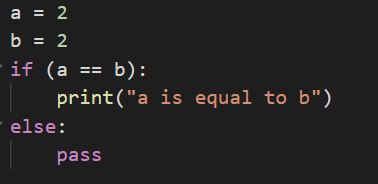
In the example above, we have created two variables, a and b and which is assigned to value “2”.
There is a if statement that says, if a is equal to b, print the statement, “a is equal to b”.
In most of the other programming languages, you would have seen if statement is wrapped around curly braces, where in here, it is spacing.
There should be a colon (:) after the expression and if the condition doesn’t satisfies, we can use else statement as shown in the example.
Let’s see what is the output here:
Since, the condition is satisfied, the print statement is executed and displayed the message (“a is equal to b”).
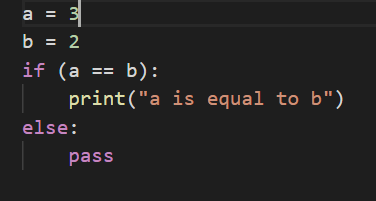
Let me change the value of ato 3 and check how the program executes.
Example:
Let’s see what is the output here:
Actually, there will not be any output here. Because, the if statement failed as a is not equal to b. So, else statement will be executed.
There is pass statement in else statement, which does nothing.
Multiple Conditions:
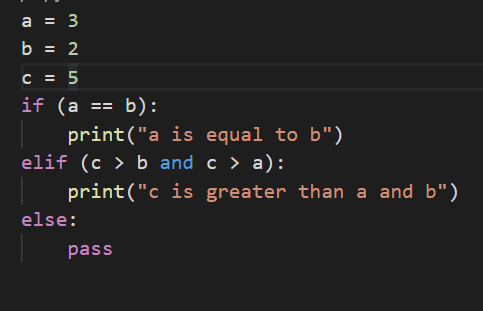
What if we have multiple conditions to check upon.
Example:
As you can see in the above block of code, to add multiple if conditions, we use elif keyword.
There is another condition added to check if c is greater than b and a variable.
Output:
Let’s see what is the output.
Hope we have understood if statement. 🙂 You can try with your own logic to understand if statement even better.
Dictionaries are a bag of key value pairs which is written inside two curly braces. It is a collection of key values pairs that is not ordered, can be changeable and can be indexed.
Rather than indexes, in any other collections like lists, arrays, etc., items can be obtained via Key.
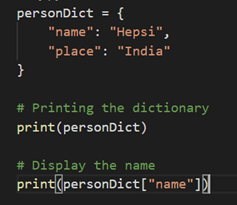
Now let’s see how to create a dictionary in Python and access the first element.
Example:
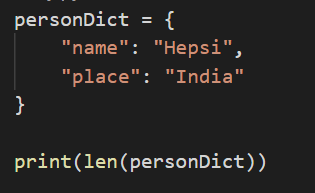
We have created a dictionary called as “personDict” that stores two values, name and the place.
In the first print statement, we are displaying the entire “personDict” dictionary.
In the second print statement, we are displaying the value of the nameKey of the “personDict”.
Let’s see what is the output here.
Output:
The first print statement has printed the entire dictionary.
The second print statement has printed thevalue of the name Key of the dictionary.
Changing the value
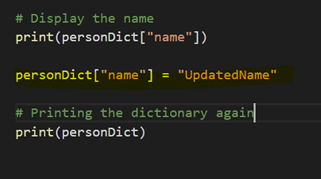
We will try to change the value of the name key in the dictionary and let’s print the dictionary again.
Example:
The highlighted statement personDict[“name”] = “UpdatedName” changes the value of name key from “Hepsi” to “UpdatedName”.
Output:
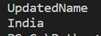
The value of ‘name’ is changed to ‘UpdatedName’.
Loops and Dictionaries
Let’s see with examples how to loop through all the elements inside dictionary and display both Key and Values. This can be achieved easily with for loop.
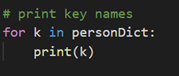
First, let’s see how to display all the Keys in the dictionary.
Example:
In the above code, for loop is used where we are looping all the items. It will display the keys.
Output:
It displayed both the keys in the personDict dictionary i.e., name and place.
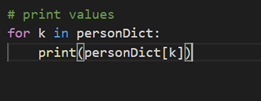
Let’s see how to display all the values in the dictionary.
Example:
In the above code, k contains all the keys and we are accessing the values using the keys in the print statement.
Let’s see what is the output.
Output:
It is displaying all the values associated with the keys.
There are variety of advanced operations that we can perform using Dictionaries. However, I would restrict myself in listing down all those here.
We will learn all the advanced concepts as we progress in our learning.
Strings in Python is very much similar like the usage in other languages.
I am going to point out the most important ways of strings formatting which is little different in Python.
Assume that there is a scenario, where you are getting a value from a method and the value that is returned from the method is a number (Integer).
You need to display this number along with String.
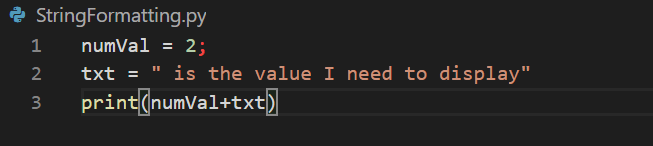
For example, let’s see and understand the below code:
The first line, declares a variable numVal which is assigned with an integer value i.e., 2.
In second line, declares a variable txt which is assigned with a string value.
In third line, the idea is to display both the numVal value and the txt value.
The expected output is:
2is the number I need to display.
But, let’s see what is the actual output is:
We get a TypeError saying integer and string can’t be concatenated.
Let’s see how to resolve this in Python way:
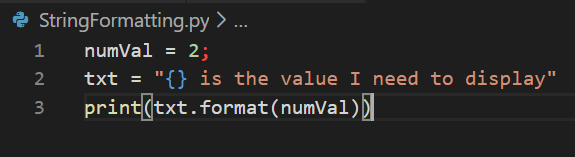
Wherever you want to display values of another type in a string, you need to create a placeholder by adding a flower bracket and using string.format replace the value as shown in the below code.
In the second line, in the text variable, wherever, we want to display 2 we will add flower bracket there.
In the third line, using format method we will pass the value that has to be displayed in the string.
Let’s see the output now:
We can replace as much as values in a strings, hence, we can add ‘n’ number of flower brackets and pass ‘n’number of values and it gets replaced accordingly.
A set is a collection which is unordered and unindexed and it is written within curly brackets.
We can’t access items within sets using indexes since it is unordered. We need to loop through all the items to retrieve the items.
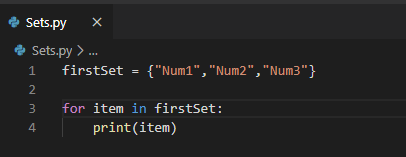
Example:
Output:
The above example shows that the set named “firstSet” is created and looped through the items inside the firstSet set so that it is printing the items from the set.
Check if an item is present in Set
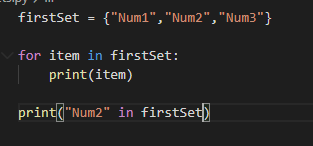
Example:
In the last line, the code is checking whether “Num2” is present in the set firstSet.
The output would return boolean value either true or false.
Since, “Num2” is present in the firstSet, it should return true.
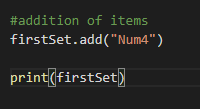
Addition of Items in Sets:
Addition of items always add the item to the end of the collection.
Example:
Output:
Removal of Items:
Removal of items will remove the item at the end of the collection.
Example:
Output:
Length:
To determine the number of items in set, we use length keyword.
Example:
In the above code, I am retrieving the length of the set and then converting the value to string to print the value.
Output:
The length of the set is 3 since the firstSet has only 3 items now.
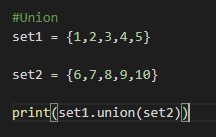
Union: This is a very important method in Set where it combines the values from two sets and returns one single set.
Example:
In the above code, i have created two sets, set1 and set2.
In the last line, sets are combined using union. Let’s see what the output is to understand better.
Output:
As shown in the output, the union operator combines the items from both the sets and displays as one set.






























 Learn Python