Pickles is one of the most important feature of Python. Pickle in Python is a representation of an object as a string of bytes.
These bytes can be saved in a database, different file path or altogether into a different computer.
Later, these bytes can be reassembled to form the original Python object which is called as Unpickling.
Major purpose of pickling is to store temporary results that can be used as an input for another Python program, creating backups, etc.
Python contains Pickle module that contains dump function to pickle an object to file and load function to unpickle a file and restoring it to the Python object.
Let’s understand more about Pickles using example.
Let’s create a file called “Pickling.py” and create an object. Here, I am creating a tuple that contains a String, Number and a floating number.

Let’s create a file named “pickle_file” to write the object into it.

It’s important to use binary mode while pickling the object into file. we have mentioned binary mode using “ab” in the open method.
We need to use dump function to write the object “object_for_pickling” into the file “test.pickle“. To do so, first step is to import pickle module.

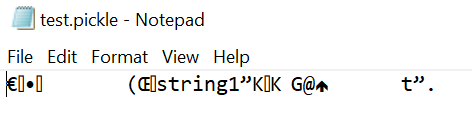
Upon executing this file, it will create test.pickle file in the current folder with the object data being added into the file in binary format.
If you open the created file, you should see some text similar to this.
Now, that the data is dumped to the test.pickle file, let’s read the object from the test.pickle file using load function.
Let’s remove the data from object_for_pickling variable before loading data into it.

Let’s read the data from test.pickle and load the data into object_for_pickling variable.
After loading, we can check if the data is loaded properly by printing object_for_pickling variable.

We have learnt about Pickling. Let’s learn few more interesting feature of Python in next post.
 Learn Python