At times, whenever we are searching for files in our System or Laptop, we have used wild card patterns like *, ?, etc.
For example, if I want to search files that starts with Hepsi, I will use pattern like Hepsi* which will list down all the files that start with Hepsi.
Python provides a function glob in the module also named glob that implements globbing of directory contents.
The glob.glob function takes a pattern and returns a list of matching filenames / paths.
For example:
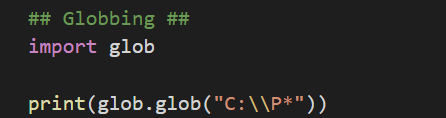
In the first line, glob module has been imported.
In the second line, glob function is call with value as “C:\\P*” which means that all the folders or files present under C drive should be listed.
We have used print function to display the values from the glob function.
Let’s execute this and check the output.
Output:

glob function has listed down all the files / folders starting with P.
Below table lists down all the wild cards that can be used in glob function.
| Wild Card Pattern | Description | Example |
| * | Lists down all the data that matches with the either 0 or more characters. | .P* – lists down all the files that starts with P extension. |
| ? | Lists down all the data that matches with one character. | ?.txt – lists down all the text files whose file name is just one character like 1.txt, a.txt, etc. |
| […] | Lists down all the data that matches with at least one character listed in the bracket | [aeiou].txt – lists down all the text files whose name has vowels in them. |
| [!…] | Lists down all the data that doesn’t matches with the character listed in the bracket | [!aeiou].txt – lists down all the text files whose name doesn’t have vowels in them. |
 Learn Python