Python provides functions to write / read files and operations like reading contents from the directory. These functions play a trivial role as most of the programs involves reading files or directories.
Let’s discuss few functions related to this.
File Object – First step to read / write files in Python is using File object.
Let’s start by creating a test file via Python.
To create a file, we need to use File object and say Python that we want to create a file.
Assume that you need to create a file in the C drive as mentioned below. We need to create Test.txt file.
C:\Python\Test.txt
We need to use the command as shown below.
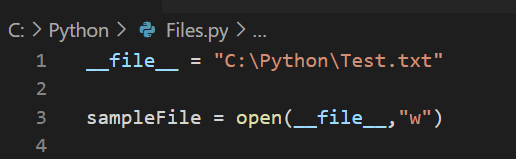
Line no 1 has a variable __file__ which stores the path.
Line no 3 has a variable sampleFile which is assigned to open function that takes __file__ as parameter and “w” – which means that the command wants to write the file.
In case if the file is not found, by passing “w” to open function by default it will create the file.
Execute the above code and you will see that the file is getting created automatically.

In case if “w” is replaced with “r“, it will throw an error as it is trying to read the file which does not exist.
Also, if we aren’t giving any value i.e., neither “w” nor “r“, by default it will assume read operation and will throw error.
Let’s write some contents in the file that is created earlier.

Now, go to the file path and open the document to see if the contents are written.
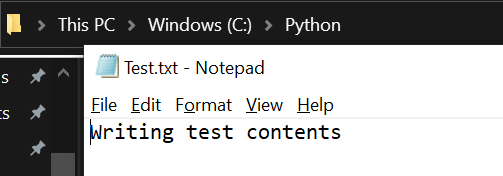
The contents are written to the text.txt file that we created.
Let’s continue to explore more on Files and Directories in further posts.
 Learn Python