Strings in Python is very much similar like the usage in other languages.
I am going to point out the most important ways of strings formatting which is little different in Python.
Assume that there is a scenario, where you are getting a value from a method and the value that is returned from the method is a number (Integer).
You need to display this number along with String.
For example, let’s see and understand the below code:
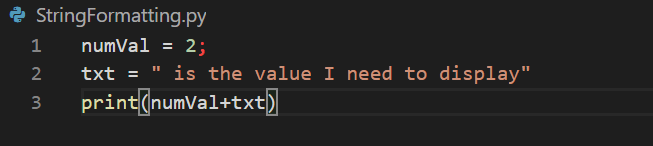
The first line, declares a variable numVal which is assigned with an integer value i.e., 2.
In second line, declares a variable txt which is assigned with a string value.
In third line, the idea is to display both the numVal value and the txt value.
The expected output is:
2 is the number I need to display.
But, let’s see what is the actual output is:

We get a TypeError saying integer and string can’t be concatenated.
Let’s see how to resolve this in Python way:
Wherever you want to display values of another type in a string, you need to create a placeholder by adding a flower bracket and using string.format replace the value as shown in the below code.
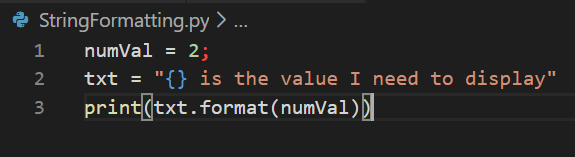
In the second line, in the text variable, wherever, we want to display 2 we will add flower bracket there.
In the third line, using format method we will pass the value that has to be displayed in the string.
Let’s see the output now:

We can replace as much as values in a strings, hence, we can add ‘n’ number of flower brackets and pass ‘n’ number of values and it gets replaced accordingly.
 Learn Python