Comments are statements that is written inside a code which is used mostly for adding the note about the code.
Comments doesn’t gets executed. It is basically ignored by the compiler.
Comments are added to increase the code readability and maintainability.
There are specific syntax that needs to be followed to write comments.
Single line comment as well as multi line comments can be added.
Let’s see how to add a single line comment
Example:

In the above example, in line no 1, the sentence starts with ‘#‘ symbol which says that it is a comment.
When we run this piece of code, we will see only “Hello World from Python” as the first statement is completely ignored by the interpreter considering it as a comment.
Output:

Comments can also be written in the same line as of the code as shown below which would give the same result.
Example:

Multi-line comments
Comments can flow into multiple lines. There is no specific syntax for multi-line comments. We need to preced with # for every single line as shown below.

The alternate way to add multi line comment is to use multi line strings as Python will ignore string literals that are not assigned to any variable.
We can use string literal i.e., triple quotes to write multi line comments as shown below.
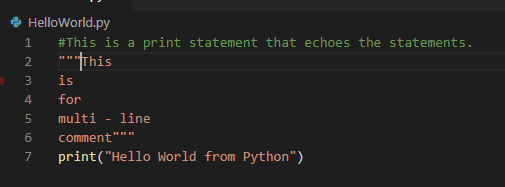
The interpreter would ignore the lines from line no 2 till line no 6 since it is not assigned to any variable and can be used for adding multi line comments.
 Learn Python